
本文介绍了在Debian9服务器上部 署WireGuard VPN的配置过程,包括密钥生 成、服务端与客户端配置文件创 建,以及通过iptables实现双端内网 互通的进阶设置方法。
Debian 部署 wireguard
2 mins
400 words
Loading views
环境h2
| 设备 | 说明 |
|---|---|
| Debian9 4.9 内核 vulrt 日本服务器 | 部署 wireguard 程序 |
| OpenWrt x86 64 | 内网网关 |
| Windows10 | 内网设备 |
部署 wireguard 服务器h2
配置 wireguard 软件源, 并且安装 wireguard 程序
apt-get install wireguard wireguard-tools# --> 准备工作目录cd /etc/wireguard/生成双端秘钥h3
mkdir server;wg genkey | tee server/privatekey | wg pubkey > server/publickeymkdir client;wg genkey | tee client/privatekey | wg pubkey > client/publickey创建配置文件h3
cat > wg0.conf  <<-EOF[Interface]Address = 172.16.220.1/24SaveConfig = falsePostUp = (echo 1 > /proc/sys/net/ipv4/ip_forward);iptables -A FORWARD -i wg0 -j ACCEPT; iptables -t nat -A POSTROUTING -o  ens5  -j MASQUERADEPostDown = iptables -D FORWARD -i wg0 -j ACCEPT; iptables -t nat -D POSTROUTING -o ens5 -j MASQUERADEListenPort = 12138PrivateKey = `cat server/privatekey`
[Peer] #ClientPublicKey = `cat client/publickey`AllowedIPs = 172.16.220.2/32EOFcat > client.conf <<-EOF[Interface]PrivateKey = `cat client/privatekey`Address = 172.16.220.2/24DNS = 8.8.8.8MTU = 1420
[Peer]PublicKey = `cat server/publickey`# AllowedIPs = 0.0.0.0/0 # 全部路由都走serverAllowedIPs = 172.16.220.0/24 # wireguard虚拟网段互通Endpoint = net200.mooo.com:12138PersistentKeepalive = 25EOFqrencode -t ansiutf8 < client.conf# 生成二维码qrencode -t ansiutf8 < client.conf多个client 就创建多个client peer配置就行了
进阶玩法h2
wireguard 双端内网互通
| 主机 | ip | wg ip | 内部网段 | 作用 |
|---|---|---|---|---|
| ServerA | 172.21.161.34 | 172.16.220.1 | 172.21.161.34/20 | 公网服务器, 部署wg服务端 |
| ClientB | 192.168.2.142 | 172.16.220.3 | 192.168.2.0/24 | 内网服务器, 部署wg客户端 |
| ClientC | 192.168.2.102 | 无 | 192.168.2.0/24 | 内网服务器 |
| 目标是让ServerA 能够直接访问 ClientC的192.168.2.102 ip |
ServerA配置h3
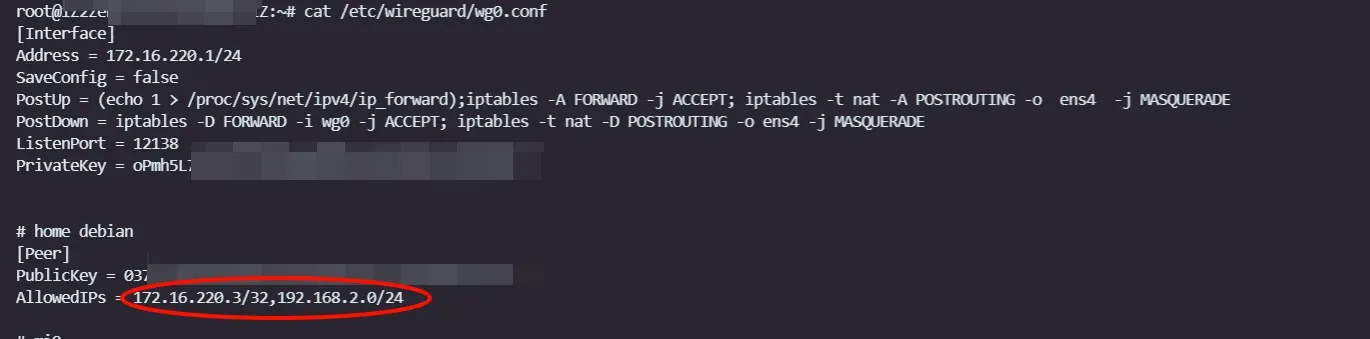
# 把server的配置改为本机的ip# AllowedIPs = 172.16.220.3/32,192.168.2.0/24AllowedIPs = 192.168.2.0/24 ip route add 172.21.161.34/32 via 192.168.2.142# 允许所有流量转发(从192.168.2.0/24到其他网络)sudo iptables -A FORWARD -d 192.168.2.0/24 -j ACCEPT
# 允许 NAT 转换,确保源地址在路由转发后是正确的sudo iptables -t nat -A POSTROUTING -s 172.21.161.34/32 -d 192.168.2.0/24 -j MASQUERADE